Event details on their calendar.
From the confirmation email.
Your confirmation email already lists the time and place. Give them a quick way to get that on their calendar.
Example Confirmation Email
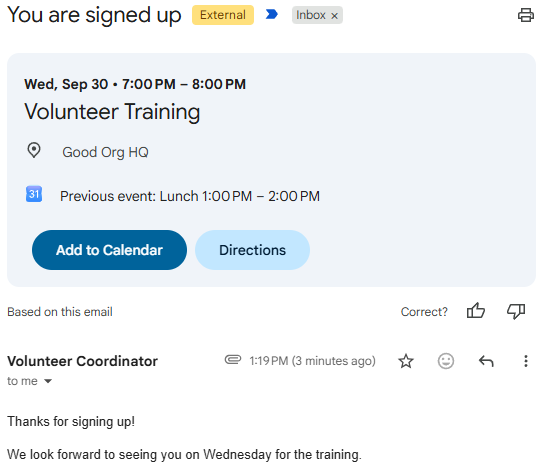
- Review
- The confirmation above is what the recipient sees.
- Install
- Production and sandbox links above. Unlocked package. It runs from the Flow that already sends the confirmation.
- Get help
- Setup notes are in the support docs. Source is on GitHub.
Examples of where this can be useful
The confirmation is the moment they decide to keep the date. Put the event in that message.
Signup confirmations
They register for a class, shift, or gathering. The email that says they’re in also puts it on their calendar.
Appointment reminders
An intake, a tour, or a visit goes out with the time and address, ready to add before they forget.
Meeting notices
Board, staff, or committee mail includes the meeting itself, not just a paragraph they have to retype.
One email. The date sticks.
The confirmation
Same kind of email you already send: who it’s for, what it’s about, when to show up.
The event, attached
They add it to the calendar they already use. The time and place are filled in.
A later change
If the time moves or the visit is called off, a follow-up email updates that same event.
The confirmation email carries an .ics file
The Flow action sends the email you already write, and attaches an .ics calendar file. That file is iCalendar, the same format an Add to Calendar button downloads for Apple and other calendars. Mail apps that understand text/calendar can offer to add the event. You pass the message and the event fields. The action does not create a Salesforce Event record.
Publish, the usual file
This is the default. The attachment is event.ics with METHOD:PUBLISH. There is no guest list. It is an event they can add, which fits a class, a shift, or a visit.
Request, when you need a reply
The attachment is invite.ics with METHOD:REQUEST. That is a meeting invitation, and attendees are asked to respond. If you choose Request and there are no guest addresses, the file is sent as Publish instead.
Cancel the same event
A later email can attach cancel.ics with METHOD:CANCEL. Reuse the Event UID from the first message and send a higher Event Sequence. Apps that honor the file remove that event.
The file includes the title, start, and end, as an all-day date or a timed event in a time zone. Leave the time zone blank and the times are written in UTC. Leave the end blank and a timed event lasts one hour. Location, description, and a URL are included when you set them. The organizer is the address the email sends from, and a reminder can be included. Store the Event UID so a later message, or the Add to Calendar button, refers to the same event.
Free package. Use it on the email that already confirms a signup, a visit, or a meeting.
Setup notes are in the support docs. Source is on GitHub.
When they should add it before they leave the screen, use Add to Calendar too. The email and the button can describe the same event.
Want this in the email you already send?
Install it yourself, or reach out for help getting it set up.