
WordPress
Use the Lightning Flow iFrame plugin to embed Salesforce Screen Flows on WordPress pages via shortcode.
Download: WordPress.org plugin directory · GitHub repository
Quick start
Section titled “Quick start”- Install and activate the plugin from WordPress.org or zip
wordpress/lightning-flow-iframe/from the GitHub repo. - Complete Salesforce setup and expose FlowIframeEmbed on a Site.
- Go to Settings → Lightning Flow iFrame and configure defaults:
- Default iFrame URL —
https://your-site.force.com/site-prefix/apex/three_levers__FlowIframeEmbed(namespaced VF path; see Salesforce setup) - Default Flow Name — Flow API Developer Name (e.g.
Check_In_Dispatch) - Default End URL — optional thank-you page (e.g.
https://yoursite.com/thanks) - Background color — optional color for the iframe page body (e.g.
F5F3F0) - Padding — optional space around the flow on that body (e.g.
0or1rem) - Primary color — optional color for Next and Finish buttons (e.g.
C75B39). Blank keeps rust - Primary hover color — optional hover for those buttons. Blank uses a darker mix of the primary color
- Secondary color — optional text and border for Previous buttons. Blank keeps dark text and a gray border
- Scroll offset — optional pixels to keep clear below a fixed header when Next or Finish scrolls the page (e.g.
81)
- Default iFrame URL —
- Add to any page or post:
[Lightning-Flow-iFrame]Settings
Section titled “Settings”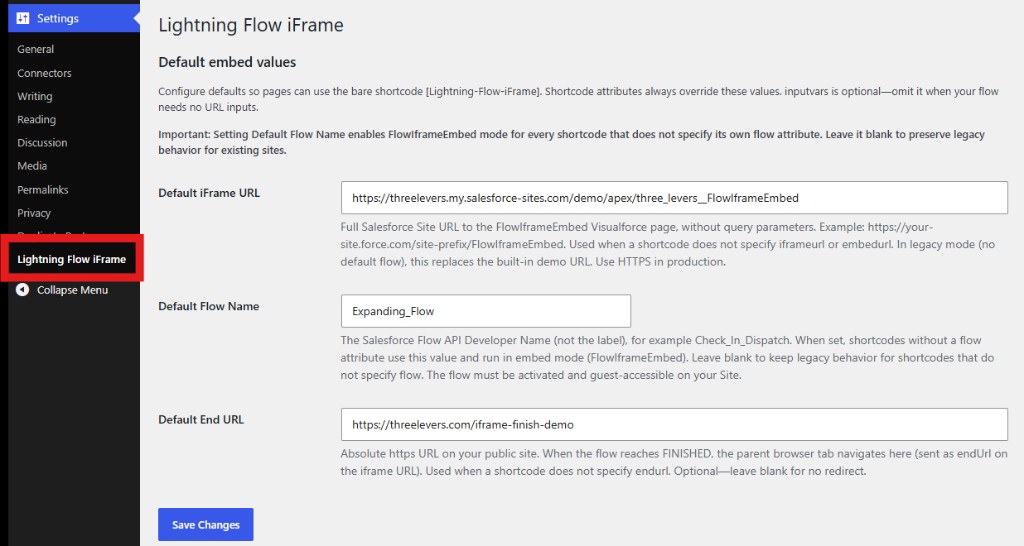
| Setting | When to use |
|---|---|
| Default iFrame URL | Avoid repeating the Salesforce Site URL on every page |
| Default Flow Name | Enables embed mode for shortcodes without a flow attribute |
| Default End URL | Redirect parent tab when flow finishes |
| Background color | Color of the iframe page body. Examples: F5F3F0, #ffffff, white |
| Padding | Space around the flow on the iframe page body. 0, 16, or 1rem 2rem |
| Primary color | Next and Finish buttons. Example: C75B39. Leave blank for rust |
| Primary hover color | Hover of those buttons. Leave blank for a darker mix of the primary color |
| Secondary color | Previous button text and border. Leave blank for dark text and a gray border |
| Scroll offset | Pixels to keep clear below a fixed header when Next or Finish scrolls the page. Example: 81. Leave blank to align with the top of the window |
Leave Default Flow Name blank on sites that still use legacy Visualforce pages without the flow parameter.
Shortcode attributes always override settings.
Optional flow inputs
Section titled “Optional flow inputs”inputvars is not required. Add it only when the flow accepts URL inputs:
[Lightning-Flow-iFrame inputvars="recordId,source" extraqs="recordId=001xxx&source=homepage"]Only parameters listed in inputvars are passed (from extraqs or the WordPress page query string).
Shortcode attributes (embed mode)
Section titled “Shortcode attributes (embed mode)”| Attribute | Description | Required | Default |
|---|---|---|---|
iframeurl | URL of public FlowIframeEmbed VF page | Yes* | From settings |
flow | Flow API Developer Name | Yes* | From settings |
endurl | Parent redirect when flow finishes | No | From settings |
inputvars | Comma-separated allowlist for flow inputs | No | none |
extraqs | Manual query params, e.g. recordId=001xxx&source=homepage | No | none |
height | Initial iframe height (e.g. "75px") | No | "50px" |
ease | Ease height adjustment animation | No | "false" |
easespeed | Ease speed in seconds | No | ".2" |
lazy | Apply loading="lazy" to iframe | No | "true" |
bg | Overrides the Background color setting for this shortcode | No | From settings |
padding | Overrides the Padding setting for this shortcode | No | From settings |
primary | Overrides the Primary color setting for this shortcode | No | From settings |
primaryhover | Overrides the Primary hover color setting for this shortcode | No | From settings |
secondary | Overrides the Secondary color setting for this shortcode | No | From settings |
scrolloffset | Pixels to keep clear below a fixed header when Next or Finish scrolls the page | No | From settings |
*Required on the shortcode or in Settings → Lightning Flow iFrame defaults.
Legacy mode
Section titled “Legacy mode”If Default Flow Name is blank and the shortcode has no flow attribute, the plugin uses legacy mode (full parent query string forwarding, endurl lowercase). Existing pages continue to work without changes.
New WordPress sites should configure defaults and use embed mode with FlowIframeEmbed.
Salesforce prerequisites
Section titled “Salesforce prerequisites”Complete Salesforce setup before embedding.
Support
Section titled “Support”WordPress-specific issues: WordPress.org support forum
See also
Section titled “See also”- JavaScript widget (non-WordPress sites)
- Flow creation
- Querystring variables
- Finish URL
- Community support